
IGNOU Assignment front page is usually the first thing students search for when assignment submission time comes close. Why? Because even after writing the entire assignment properly, one small mistake on the front page can create unnecessary problems later.
Are you wondering whether the front page should be handwritten or printed?
Confused about what details are compulsory and what can be skipped?
Not sure if you are using the correct format?
If yes, you are not alone. Almost every student studying at Indira Gandhi National Open University faces this confusion at least once. This page clears everything in a simple, student-to-student way.
What is IGNOU Assignment Front Page, really?
So, what exactly is this front page?
Is it just a formality?
Not really.
The IGNOU assignment front page is the identity card of your assignment. It tells the evaluator who you are, which course the assignment belongs to, and from which study centre it has been submitted.
Now imagine this — hundreds of assignments are collected at a study centre. If even one assignment gets separated from the bundle, how will IGNOU know it belongs to you?
The answer is simple: through the front page only.
What details must be written on IGNOU Assignment Front Page?
Students often ask, “What exactly do I need to write?”
Here is the correct and safe format.
Your IGNOU assignment front page should include:
- Your full name (as per IGNOU records)
- Enrollment number (check twice)
- Programme name and programme code
- Course code and course title
- Assignment number (if mentioned)
- Study centre code
- Regional centre
- Session (January or July, with year)
- Date of submission
- Your signature
No extra design. No colours. Just clear, correct information.
Should the IGNOU Assignment Front Page be handwritten?
This is probably the most common doubt.
Should it be typed?
Should it be printed?
Should everything be handwritten?
Here’s the clear answer: IGNOU expects the assignment front page to be handwritten.
You may download a ready format, but the details must be filled using a pen. Many study centres do not accept typed or digitally filled front pages.
- Keep these small but important points in mind:
- Use blue or black pen only
- Write neatly, preferably in capital letters
- Use a separate front page for each subject
- Never attach multiple subjects under one front page
IGNOU Assignment Front Page Filled Sample (Handwritten & Typed)
Below is a clear comparison between a handwritten and a typed IGNOU assignment front page. Both samples show how student details, course information, and session details are filled correctly in the prescribed format.
The images below demonstrate correctly filled handwritten and typed IGNOU assignment front pages. While both show the required format.
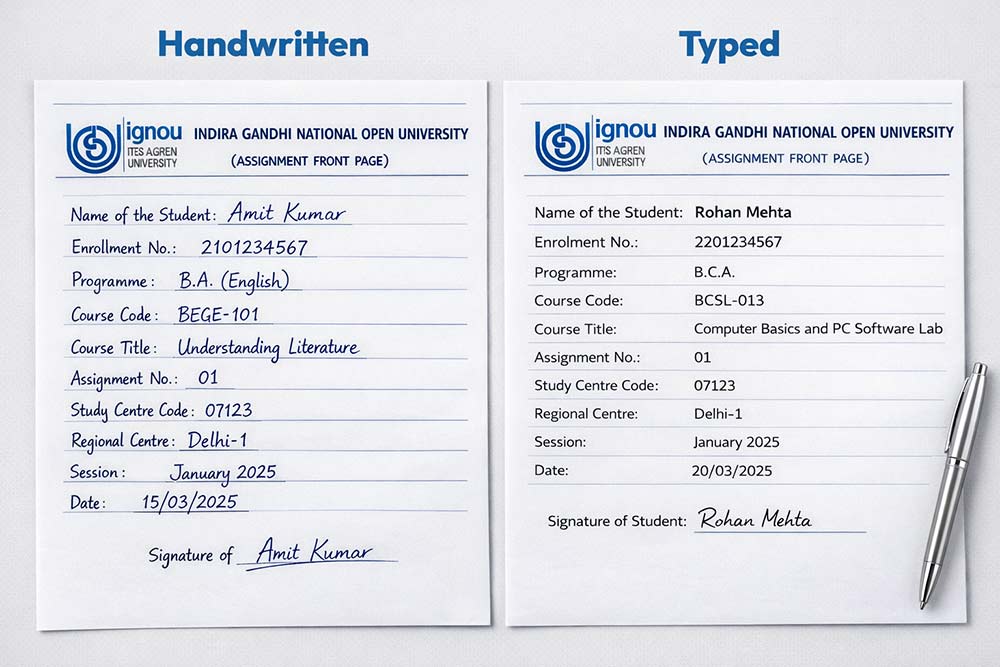
The handwritten sample reflects the recommended and widely accepted method followed by IGNOU study centres, while the typed version is shown only for understanding the layout and fields. Students should always prefer handwritten filling unless their study centre has given specific instructions otherwise.
Use these samples as a reference to avoid mistakes, ensure correct formatting, and confidently prepare your own IGNOU assignment front page.
Before submitting, ask yourself:
- Is my enrollment number correct?
- Does the course code match the question paper?
- Is the session written correctly?
- Have I signed the front page?
These small checks can save big trouble later.
How to write IGNOU Assignment Front Page step by step
Still confused? Let’s keep it very simple.
- Download the IGNOU assignment front page format
- Take a clean A4 printout
- Fill all details neatly by hand
- Recheck programme and course codes
- Sign at the bottom
- Attach it as the first page of your assignment
That’s all you need to do. No extra effort required.
Download IGNOU Assignment Front Page PDF (Free)
To make things easier, we have shared a free IGNOU assignment front page PDF. You can download it, print it, and use it for all subjects by filling details separately.
👉 Click here to download Front Page PDF
Why IGNOU Assignment Front Page should never be ignored
Many students think, “It’s just a front page, what can go wrong?”
But here’s the reality.
Assignments usually carry 30% marks. If the front page details are wrong or missing, your assignment marks may not get updated, even if your answers are correct.
Once assignments are evaluated, marks are reflected separately, which students can verify through the IGNOU Assignment Result section.
This can lead to:
- Assignment marks not showing in grade card
- Submission status missing
- Re-submission in the next session
All because of a careless front page.
After submission, students should regularly check their IGNOU Assignment Status to confirm that their assignments have been successfully received and recorded.
Common Mistakes in IGNOU Assignment Front Page (Students Should Avoid)
Many students lose marks or face assignment status issues due to small errors on the IGNOU assignment front page. Avoid these common mistakes while filling and submitting your assignments:
- Writing an incorrect course code on the IGNOU assignment front page
- Forgetting to mention the correct session (January or July)
- Submitting a typed or printed front page without handwritten details
- Missing student signature on the front page
- Using one IGNOU assignment front page for multiple subjects
Avoiding these mistakes ensures your IGNOU assignment front page is accepted and your assignment marks are updated smoothly.
If you are short on time or finding it difficult to write IGNOU assignments, you can take guidance from solved assignment references prepared as per IGNOU guidelines.
📲 WhatsApp: 7428482160
Note: Solved assignments are for reference only.
Quick questions students keep asking
Ans. Yes. Without it, assignments may not be evaluated.
Ans. Yes, but all details must be handwritten.
Ans. Yes, one subject = one front page.
Ans. If space is provided, it is better to fill it.
Final thought
If you are spending hours writing your assignments, why risk marks because of a simple front page mistake?
Fill the IGNOU Assignment front page carefully once — and submit with confidence.